Introduction: How to Save Instagram Reels to Gallery
Every day, millions of users ask the same question: What are the best ways to save Instagram Reels to my phone?
👉 Click here to go directly to the Downloader Tool
Pro Tips: While most apps only handle Instagram, SocialDownload also works as a Facebook Reels Downloader
With so many apps on the App Store and confusing websites, finding a method that is safe, free, and actually works can be difficult. Some apps leave a giant watermark on your video, while others remove the audio completely due to copyright glitches.
In this guide, we have tested and ranked the 5 best ways to save Instagram Reels in 2026. Whether you are using an iPhone, Android, or PC, one of these methods will work perfectly for you.
| Method | Audio Quality | Watermark? | Difficulty |
| 1. SocialDownload.app | High (Original) | No | Easy |
| 2. Screen Recording | Low (Mic Noise) | Yes (UI) | Easy |
| 3. Telegram Bots | Medium | No | Medium |
| 4. Browser Extensions | High | No | Hard (PC only) |
| 5. Instagram “Save” | N/A | N/A | Easy(In-App) |
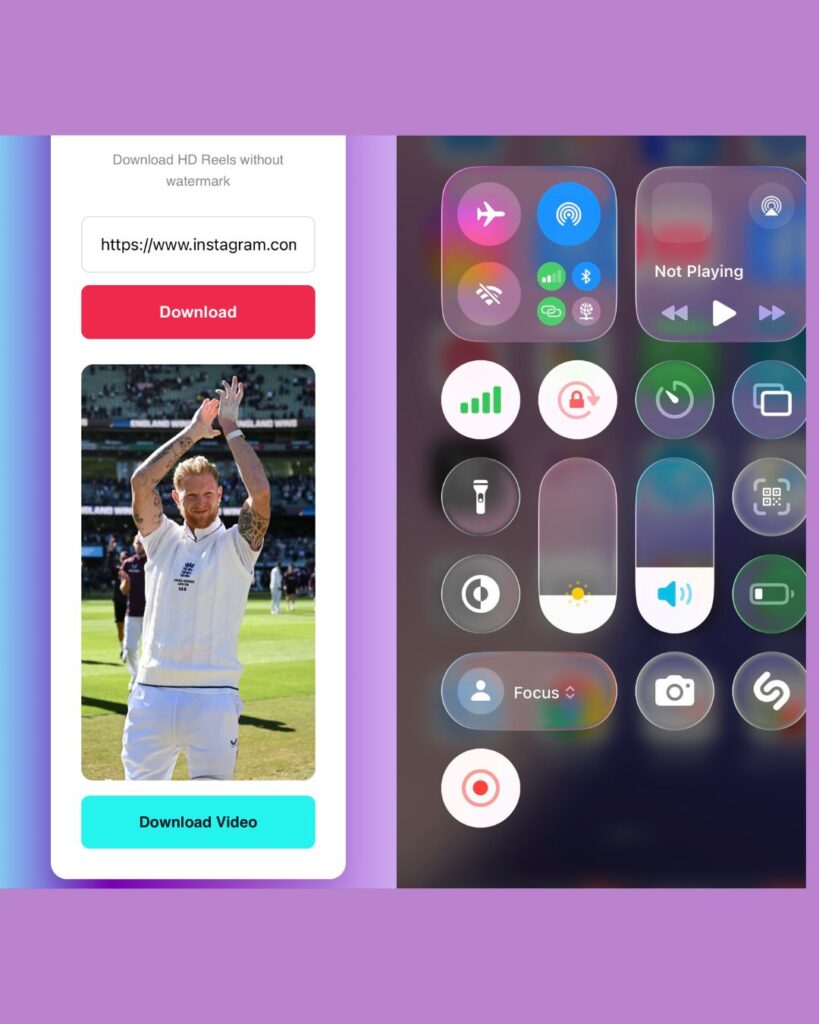
1. Use an Online Downloader (Best Overall)
To save an Instagram Reel to your gallery, copy the Reel’s link from the app, paste it into a safe web tool like SocialDownload.app, and click Download. This method preserves the 1080p resolution and original audio without adding any watermarks.
For most users, using a dedicated website like SocialDownload.app is the superior choice.
Why is this the winner? Because it downloads the original MP4 file directly from Instagram’s servers. This means you get the exact same quality as the creator uploaded—1080p resolution, crisp audio, and absolutely no watermarks.
How to do it:
1. Copy the Reel link from Instagram.
2. Paste it into SocialDownload.app.
3. Click Download.
Pros:
No app installation required (Safe).
Works on iOS, Android, Windows, and Mac.
100% Free with no login needed.
Cons:
Requires an internet connection.
2. Screen Recording (The “Quick & Dirty” Method)
If you are in a rush and don’t care about quality, your phone’s built-in screen recorder is one of the best ways to save Instagram Reels instantly.
For iPhone: Go to Settings > Control Center and add “Screen Recording.” Swipe down from the top right of your screen and tap the “Record” button.
For Android: Swipe down to access your Quick Settings panel and look for “Screen Recorder.”
Pros:
Instant; no external tools needed.
Cons:
Bad Audio: It often records background noise or notifications.
Cluttered Video: The recording will show the heart icon, comments, and captions covering the video.
Low Resolution: It only records what your screen displays, not the full HD file.
3. Telegram Bots (For Tech-Savvy Users)
Did you know the messaging app Telegram has bots that can fetch videos for you? This is a popular trick among power users.
You simply find a bot (like “InstaSave”), send it the link to the Reel, and it replies with the video file.
Pros:
Fast if you already use Telegram.
No ads.
Cons:
Unreliable: These bots frequently get banned by Instagram and stop working.
Privacy Risks: You are sharing your data with an anonymous bot developer.
4. Browser Extensions (Desktop Only)
If you mostly browse Instagram on your computer (Chrome or Firefox), a browser extension can add a convenient “Download” button right next to the video.
Pros:
One-click downloading.
Very fast workflow for social media managers.
Cons:
- Desktop Only: This does not work on the Instagram mobile app.
- Security Risk: Bad extensions can track your browsing history or inject ads into your browser. Always check reviews before installing one.
5. Instagram’s “Save to Collection”
We have to include the official method. You can tap the “Bookmark” icon to save a Reel to your internal Instagram collection.
Pros:
- The only official way to “save” content.
Cons:
- Not a real download: The video stays online. You cannot watch it without internet.
- Disappearing Content: If the creator deletes the video or makes their account private, it vanishes from your collection too.
Conclusion: Which Method Should You Choose?
When looking for the best ways to save Instagram Reels, the choice comes down to quality.
- If you just want to remember a recipe or a joke for later, use Screen Recording.
- If you want to repost the video, share it on WhatsApp status, or keep it forever in HD, use SocialDownload.app. It is the only method that guarantees high quality, clear audio, and zero watermarks.
Ready to try? Scroll up to the top of our site and paste your first link now!
Q. Can I save Instagram Reels without posting them?
A: Yes. You can download any public Reel using SocialDownload.app without needing to post it to your own profile first.
Q: Why do saved Reels have no sound?
A: If you use the “Save Video” button inside Instagram, it often removes audio due to licensing. Using a web downloader preserves the audio track.
Q: Is it safe to use online downloaders?
A: Yes, as long as the tool does not ask for your Instagram password or require an app installation.